
Guided role-aware tour · 5 steps
Which renewals need attention next?
See where renewal work is building, surface material premium changes and give the responsible person the context to investigate. Keelridge brings dates, prior-term comparisons and review state together so the team can decide what to follow up next.
KEELRIDGE SOFTWARE · REVIEWED · Screens come from a fictional, read-only agency.
 Account manager viewOpen this page in the live demo →
The short answer
One agency context. The right renewal view for each responsibility.
Where is the work building?
Read the calendar to plan capacity. Account managers review their own book; department managers review the team they are responsible for.
Which changes deserve a closer look?
Start from a material premium-change flag, then inspect the date, amount and policy context before drawing a conclusion.
What should happen next?
People choose the next action. Keep review state beside the queue and complete authoritative service work in the AMS.
Where will renewal work cluster?
Read policy count and current term premium together across the next twelve months. A busy month may need earlier preparation or a conversation about team capacity. The calendar helps make that decision before the nearest renewals dominate the queue.
The view carries current term premium forward for planning. A six-month policy can appear twice in the year. Check the source date and distinguish recorded expirations from projected second events; neither predicts the next price or guarantees renewal.
Explore the renewal calendar as an account manager →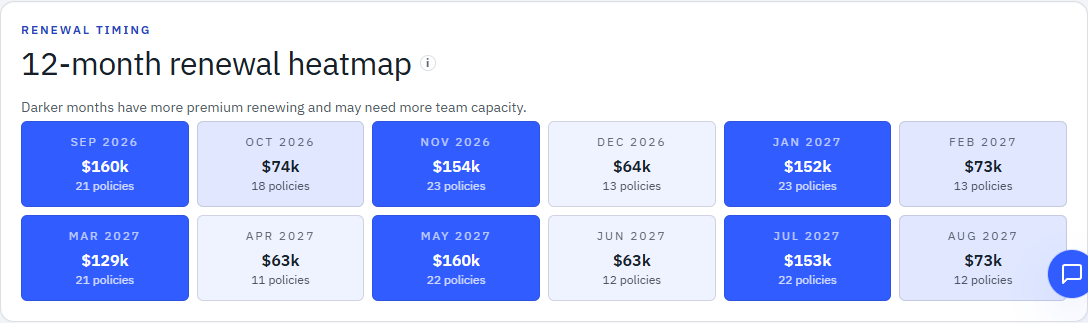 Account manager viewOpen this page in the live demo →
Which premium changes deserve attention?
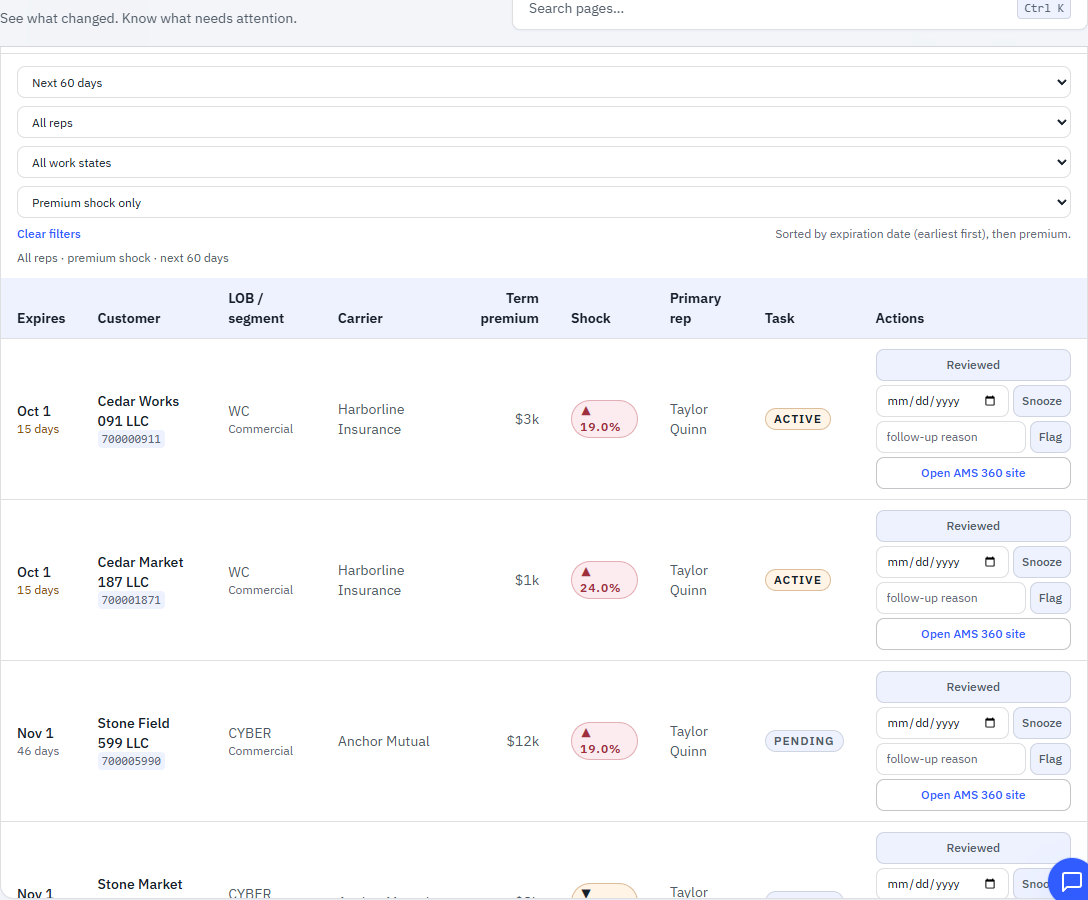
Use a premium-change flag as a starting point for review. Narrow the upcoming work to material changes, then read urgency alongside the amount involved. Pair the review with a workable horizon, such as the next 60 days.
The fixed threshold flags current term premium at least 15% above or below the same policy's prior term. It requires usable prior-term history and compares premiums already in the Book record. Keep renewals approaching expiration in the review too.
Inspect the filtered worklist in the fictional demo →
Account manager viewOpen this page in the live demo →
What do we need to understand before acting?
Inspect the customer, carrier, line, current premium and prior comparison. Bring the agency's source records and account knowledge into the review: what changed in the exposure, limits, coverage or carrier terms, and what should the client conversation address?
Keelridge keeps the available policy context beside the flag so the responsible person can investigate without rebuilding a separate list. The percentage identifies a change; the agency establishes the reason and decides whether further review or remarketing is appropriate.
Account manager viewOpen this page in the live demo →
Decide what needs follow-through.
Keep the review state with the renewal so the team can return to it without starting over. Mark it reviewed, snooze it until the appropriate date or flag it for follow-up.
Department managers use their authorized team view to see where help is needed. Account managers work within their own book. People own the next actions, client conversations and authoritative service documentation in the AMS.
Walk the read-only renewal workflow →
Account manager viewOpen this page in the live demo →
Refresh the evidence. Keep the review moving.
The renewal review should not have to be assembled by hand every time the team meets. After mapping, authorized staff upload supported AMS reports, review validation and confirm the update. Dated Book records bring renewal dates, current premium, available prior-term comparisons and account responsibility into the same review.
Management and account teams work from the same agency context, with the views and context each role needs. People decide where to focus and complete service work in the AMS. Reports can be refreshed whenever a supported new export is available.
See how recurring source files become role-specific work →Before drawing a conclusion
Put the change in its agency context.
- Check the dates and comparison.Read current term premium against usable prior-term history. The calendar is planning context; the AMS export contains no next-term premium.
- Investigate the reason.A premium-change flag is a signal, not a diagnosis. Rate, exposure, limits, coverage and audits need source records and human judgment.
- Keep access appropriate to the role.Account managers see their own book; department managers see their authorized team. Commission, payout and profitability stay outside both views.
- Keep insurance work with the agency.People decide what to do. Advice, client communication, documentation and policy transactions remain with licensed staff and the AMS.
Questions from account teams
Before acting on a premium-change flag.
How should an insurance agency review renewal premium increases?
Start with the renewal load inside an actionable horizon, then review policies whose current term premium changed materially from the prior term. Keelridge flags changes of at least 15% in either direction. Read the expiration date, dollar change, carrier, line and customer context together before deciding what needs investigation or follow-up.
Read the note →What is a premium shock?
Keelridge uses a fixed 15% threshold, up or down, to compare the current term premium with the same policy's prior term. The change is current premium minus prior premium, divided by prior premium. A usable positive prior premium is required; a missing comparison does not mean the premium was unchanged. This is a signal, not a diagnosis, and does not estimate the next term's premium.
How far ahead should account managers review renewals?
Choose a window your team can act on: the worklist supports 14, 30, 60 and 90 days, with 60 days as the default. Use the twelve-month calendar for the broader load, and check the source date before relying on the queue. The calendar carries current term premium forward for planning, including a second renewal event for six-month policies; it does not predict prices or whether a policy will renew.
Does Keelridge replace the renewal work in the AMS?
Keelridge organizes renewal review from supported Book snapshots. People decide what to investigate, mark as reviewed, snooze or flag for follow-up. Coverage advice, client communication, policy transactions and authoritative documentation remain with licensed agency staff and the AMS. The fictional public demo shows these controls but never saves changes. Its AMS launch opens the vendor website, not a verified policy-record link.
Your agency’s renewal review
Start with the work your team needs to see.
Book a 30-minute owner walkthrough using fictional agency data. Discuss how the team reviews renewals today, where the queue gets rebuilt by hand and who needs the context to follow through. No agency files are needed for the conversation.
Review the design-partner pilot terms →